Code 39 Extended barcode API
Code 39 extended to the full ASCII set, including lowercase letters and punctuation.
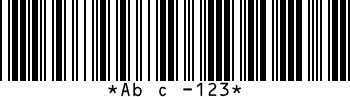
What Code 39 Extended is for
Extended Code 39 encodes lowercase letters and punctuation by using pairs of standard Code 39 characters. Use it when a system expects Code 39 but your data contains more than capitals and digits. The scanner must have full-ASCII mode switched on.
Make one from a URL
Send the text and get the image back. Your API key goes in a header.
curl "https://barcode.fmdeploy.com/v2/barcode/code39extended?text=Abc-123&label=true" \
  -H "Authorization: Bearer bc_live_your_key" -o code39extended.png
Add &output=svg for a vector image that stays sharp at any print size.
From FileMaker
Insert from URL [ Select ; With dialog: Off ; Target: Items::Barcode ;
  "https://barcode.fmdeploy.com/v2/barcode/code39extended?label=true&text=" & GetAsURLEncoded ( Items::Code ) ;
  cURL options: "--header \"Authorization: Bearer " & $$BARCODE_KEY & "\"" ]
What it accepts
Any ASCII text. Lowercase letters and punctuation take two symbols each, so codes grow quickly. Example: Abc-123
If the text can’t be encoded, the API answers with a clear message instead of a broken image.
Options
Set the bar width with scale, the bar height with thickness, and turn the text under the bars on with label. You can also choose the label font and size, rotate the image in quarter turns, set the DPI stored in a PNG, or ask for SVG. The documentation lists every parameter and its default.
Related formats
Try Code 39 Extended with a free key
200 barcodes free every month. No card needed.